
USPS Registered Mail Forms and Labels Guide (Label 200 & PS Form 3806)
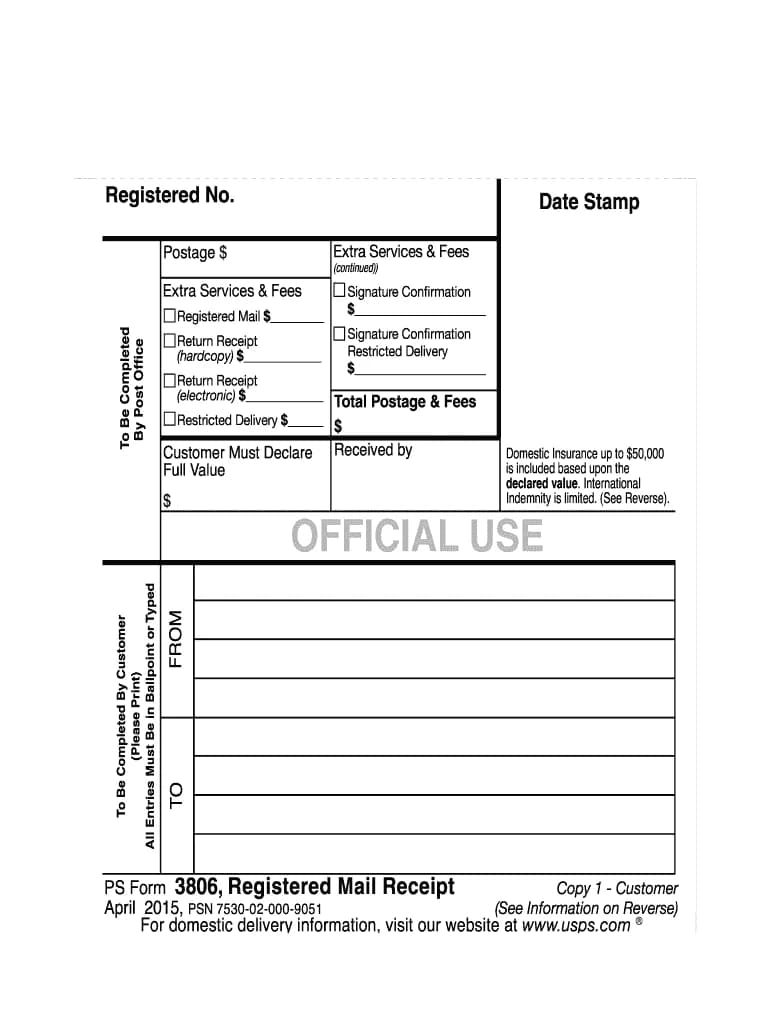
Quick Answer: USPS Registered Mail Forms
- Label 200: Official USPS registered mail label with tracking barcode
- PS Form 3806: Receipt and insurance declaration form
- PS Form 3811 (optional): Return receipt (green card) for proof of delivery
- Where to get: All registered mail forms and labels provided free at post office
Registered mail is the most secure USPS mailing service, providing maximum security, tracking, and insurance for valuable or sensitive documents. The service requires specific USPS registered mail forms and labels that document the chain of custody from sender to recipient. This guide explains all required registered mail forms, how Label 200 works, and step-by-step PS Form 3806 instructions for registered mail preparation.
Prefer to mail a letter online? Upload your PDF and we handle printing, postage, and USPS handoff.
In This Guide
What is Registered Mail?
Registered mail is USPS's most secure mail service. Every piece of registered mail is tracked through its entire journey from acceptance to delivery. Each postal employee who handles the mail signs for it, creating a documented chain of custody. Registered mail is kept in locked containers and secure areas throughout transit. The service includes insurance coverage for the value you declare (up to a maximum of $50,000), and the registered mail fee scales with your declared value. It is commonly used for valuable items like jewelry, stock certificates, legal documents, and mailing checks safely.
For a complete overview, see our full guide to registered mail.
Label 200: Registered Mail Label Explained
What Label 200 is:
Label 200 is the official USPS registered mail label affixed to the outside of every registered mail piece. The label is a bright red USPS registered mail label with a barcode and tracking number. It alerts postal workers that the mail requires registered handling and security procedures. The label includes sender and recipient addresses, the registered mail tracking number, and may include insurance value.
How Label 200 works:
- Postal clerk affixes Label 200 to your envelope or package at the counter
- Label includes unique tracking number (beginning with "R" for registered, similar to how certified mail uses PS Form 3800 for tracking)
- Barcode is scanned at every handoff point throughout delivery
- Creates digital and physical record of chain of custody
- Recipient signs for delivery, completing the chain of custody
You cannot print or create Label 200 yourself. It must be affixed by a postal clerk at a post office counter when you mail registered mail.
PS Form 3806: Registered Mail Receipt and Instructions
What PS Form 3806 is:
PS Form 3806 is the official receipt and insurance declaration form for registered mail. You fill this out at the post office when mailing registered items. Follow these PS Form 3806 instructions: the form documents what you are sending, its declared value for insurance, and any special services you are adding (return receipt, restricted delivery, etc.).
Information required on PS Form 3806:
- From: Your complete name and return address (see our envelope addressing guide for proper format)
- To: Recipient's complete name and delivery address
- Declared value: Insurance value (determines registered mail fee)
- Contents description: Brief description of contents (e.g., "legal documents")
- Special services: Check boxes for return receipt, restricted delivery, etc.
- Postage: Clerk will calculate total postage and fees
After filling out PS Form 3806:
- Clerk weighs your mail and calculates postage
- You pay First-Class postage + registered mail fee based on declared value
- Clerk stamps the form as proof of mailing
- You receive a stamped copy as your official receipt
- Keep this receipt—it is your proof of mailing and insurance claim documentation
Return Receipt Options for Registered Mail
Registered mail does not automatically include proof of delivery. To get proof that the recipient received your registered mail, add a return receipt:
Option 1: PS Form 3811 (Green Card)
- Physical postcard (PS Form 3811) mailed back to you with recipient's signature
- Shows who signed, signature, and delivery date
- Costs $4.40 (as of 2025)
- Physical proof you can keep in your files
Option 2: Electronic Return Receipt
- Digital proof of delivery emailed to you (see our electronic return receipt guide)
- Shows who signed and delivery date
- Costs $2.82 (cheaper than green card)
- Delivered via email; can print or save digitally
Request return receipt when filling out PS Form 3806. The clerk will attach the green card or note electronic receipt on the form.
How to Prepare Registered Mail: Step-by-Step
Step 1: Prepare Your Envelope or Package
- Use a sturdy envelope or box appropriate for contents
- Seal all edges with strong tape (registered mail must be fully sealed)
- Write or print sender and recipient addresses clearly on the outside (see our envelope addressing guide for proper format)
- Postage can be paid via stamps, meter, or permit—the key requirement is in-person acceptance by a postal clerk (registered mail cannot be dropped in collection boxes)
Step 2: Go to the Post Office
- Registered mail can only be sent from a post office counter (not collection boxes)
- Bring your sealed mail and any necessary documentation
- Tell the clerk you want to send registered mail
Step 3: Fill Out PS Form 3806
- Clerk will provide the form
- Fill in sender, recipient, declared value, and contents description
- Check boxes for any additional services (return receipt, restricted delivery)
Step 4: Clerk Affixes Label 200
- Clerk attaches Label 200 to your envelope or package
- Clerk weighs mail and calculates postage
- Clerk stamps PS Form 3806 and gives you a copy
Step 5: Pay and Keep Receipt
- Pay postage plus registered mail fee (starts around $19–$20 as of mid-2025, increases with declared value; USPS prices change periodically—check current Notice 123 for exact rates)
- Keep your stamped PS Form 3806 receipt as proof of mailing
- Use the tracking number on Label 200 to track your mail online
Send Certified Mail Online Instead (For Most Use Cases)
For most situations, certified mail provides sufficient tracking and proof of delivery at a lower cost. The Letter Pilot handles all forms and mailing for you—upload your letter and we mail it with tracking next business day.
Send Certified Mail Online →Bulk Registered Mail
If you are mailing multiple pieces of registered mail at once, you can use bulk processing:
- Each piece still requires its own Label 200
- Clerks may use additional forms or manifests for multiple registered items, similar in concept to PS Form 3877 for certified mail
- All pieces must be presented to the clerk at the same time
- Each item is tracked individually with its own registered number
FAQs
What is Label 200 for registered mail?
Label 200 is the official USPS registered mail label affixed to the outside of registered mail pieces. It includes a barcode, tracking number, and indicates the mail is registered and requires special handling.
What forms are required for registered mail?
Registered mail requires Label 200 (registered mail label), PS Form 3806 (receipt and insurance form), and optionally PS Form 3811 (return receipt green card) if you need proof of delivery.
How do I prepare registered mail?
Seal the envelope securely with tape over all seams, fill out PS Form 3806 at the post office, have the clerk affix Label 200, pay postage plus registered mail fee, and keep your stamped receipt.
Can I print Label 200 myself?
No. Label 200 must be affixed by a postal clerk at the post office counter. Registered mail requires in-person processing and cannot be prepared at home.
Where do I get registered mail forms?
All registered mail forms (PS Form 3806, Label 200, PS Form 3811) are free and provided by the postal clerk at the post office when you mail registered items.
How much does registered mail cost?
Registered mail costs First-Class postage plus a registered mail fee starting around $19–$20 (as of mid-2025). Fee increases based on declared insurance value. Add $4.40 for return receipt green card or $2.82 for electronic return receipt (as of 2025). USPS prices change periodically—check current Notice 123 for exact rates.
Do I need insurance with registered mail?
Registered mail includes insurance coverage for the value you declare (up to a maximum of $50,000)—you don't buy a separate insurance add-on, but the registered mail fee scales with your declared value. You declare the value when filling out PS Form 3806.
What is the difference between registered mail and certified mail?
Registered mail provides maximum security with chain-of-custody tracking and high insurance ($50,000 max). Certified mail provides proof of mailing and delivery but no insurance and less security. Registered is for high-value items; certified is for important documents.
Can I track registered mail online?
Yes. Use the tracking number from Label 200 to track registered mail at USPS.com. Tracking shows each scan point as the mail moves through the postal system.
Can I send registered mail online?
No. Registered mail requires in-person acceptance by a postal clerk at a post office counter. You cannot print Label 200 or prepare registered mail at home. The clerk must verify the sealed package, affix Label 200, and process PS Form 3806 in person. For online options with tracking, consider certified mail instead.
Does registered mail include insurance or do I pay extra?
Registered mail includes insurance coverage for the value you declare (up to a maximum of $50,000)—you don't buy a separate insurance add-on, but the registered mail fee scales with your declared value. You declare the value when filling out PS Form 3806, and insurance up to that amount is included in the fee.
How long does registered mail take to deliver?
Registered mail travels with First-Class Mail, typically 2-5 business days domestically. The additional security handling may add 1-2 days compared to regular First-Class delivery.
Related Guides
- What is Registered Mail?
- What is Certified Mail?
- How to Fill Out PS Form 3811 (Green Card)
- USPS Electronic Return Receipt Explained
- How to Fill Out PS Form 3800
Tags: registered mail forms, Label 200, PS Form 3806, registered mail labels, Registered Mail Label 200, PS Form 3806 instructions, how to prepare registered mail