
How to Fill Out PS Form 3800 (Certified Mail Receipt)
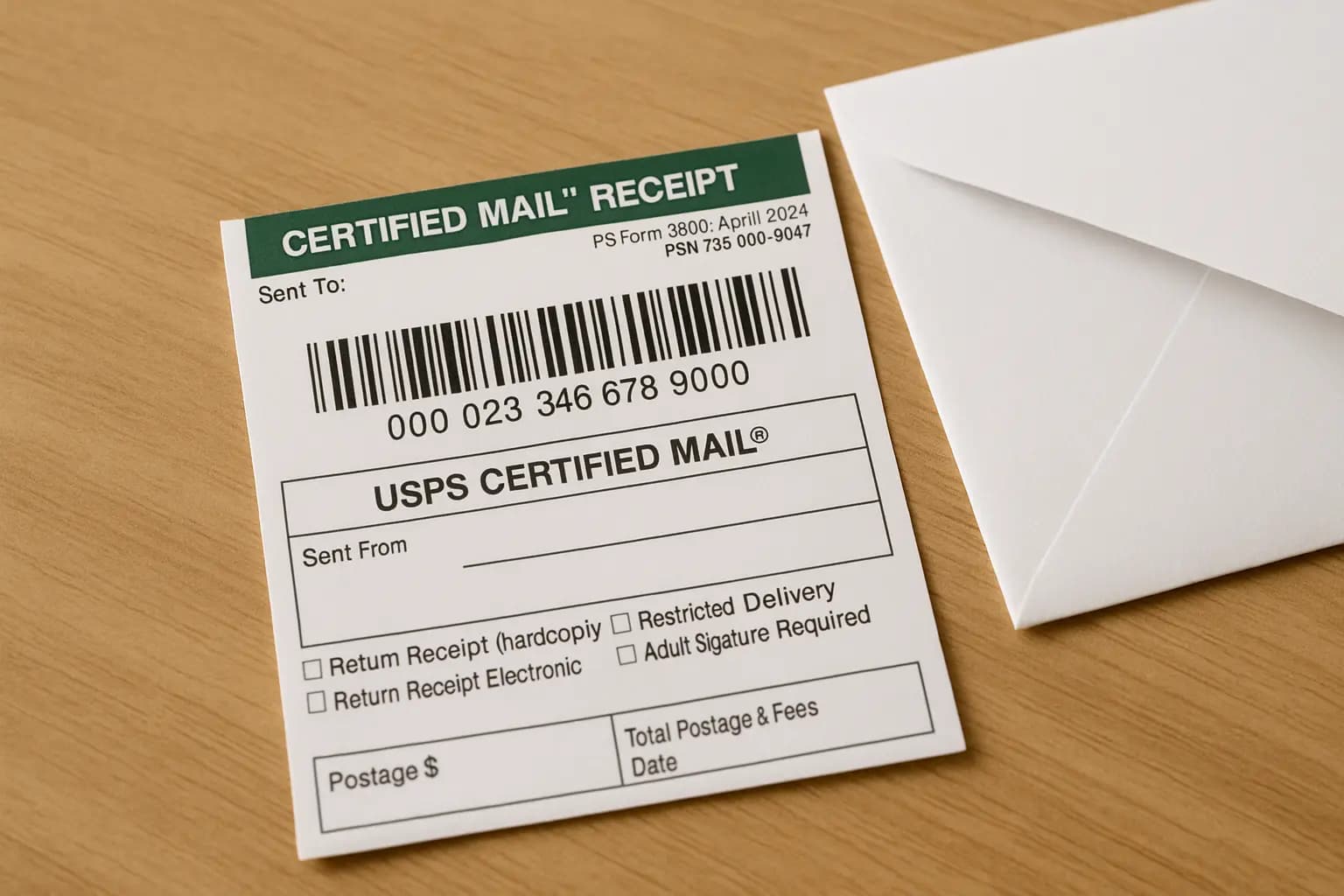
PS Form 3800 is the white Certified Mail Receipt you receive when sending USPS certified mail. This form contains your tracking number and serves as proof of mailing for legal, business, or personal correspondence.
Quick Answer: Filling Out PS Form 3800
- Write recipient address exactly as it appears on envelope
- Record 20-digit tracking number before mailing
- Check service boxes if purchasing return receipt or restricted delivery
- Hand to clerk at post office to get stamped receipt
- Keep receipt as legal proof of mailing
Knowing how to fill out PS Form 3800 correctly ensures you have an accurate record and can track your mailpiece. This guide provides complete PS Form 3800 instructions, explaining the certified mail receipt step by step, including what each field means, how to attach it, and how to avoid common mistakes. Whether you are mailing tax documents, legal notices, or important contracts, completing PS Form 3800 correctly at the post office gives you proof of mailing that is legally valid and traceable.
Prefer to mail a letter online? Upload your PDF and we handle printing, postage, and USPS handoff.
In This Guide
What PS Form 3800 Is (USPS Certified Mail Receipt Explained)
PS Form 3800 is the official USPS Certified Mail Receipt. When you send certified mail, this form attaches to your envelope and gets stamped at the post office as proof of mailing. The top portion with the tracking barcode stays on your mailpiece during transit. The bottom portion is your receipt to keep. This form is required for all certified mail and includes a unique 20-digit tracking number that lets you track delivery status online.
Anatomy of the Form
PS Form 3800 has several key sections:
- Tracking barcode: The preprinted 20-digit number used to track your mail online via USPS tracking
- Sent To field: Recipient name and complete delivery address
- Sent From field: Your return address (optional on this form)
- Service checkboxes: Additional services like return receipt (PS Form 3811), electronic return receipt, restricted delivery, or adult signature
- Postage area: Where the clerk writes or stamps the total postage amount
- Date stamp area: Post office date stamp proving when you mailed it
How to Fill Out PS Form 3800: Step-by-Step Instructions
Step 1: Fill in the recipient address
In the "Sent To" section, write the complete delivery address exactly as it appears on your envelope:
- Recipient name
- Street address or PO Box
- City, State, ZIP Code
This address must match what is written on your envelope to avoid delivery issues.
Step 2: Check additional service boxes
If you purchased extra services, check the appropriate boxes:
- Return Receipt (PS Form 3811): Check if you want a signed green card returned as proof of delivery. Learn more in our PS Form 3811 guide.
- Return Receipt Electronic: Check if you want an emailed delivery confirmation with signature
- Restricted Delivery: Check if only the named recipient may sign
- Adult Signature: Check if an adult must sign (21+ for some items)
Step 3: Record the tracking number
The 20-digit tracking number is preprinted on the form. Write it down or photograph it before attaching the form to your envelope. This number is your only way to track the mailpiece and prove delivery. You can use it for USPS certified mail tracking online.
Step 4: Attach to your envelope
Peel the adhesive backing and attach the top barcode portion to your envelope. Position it on the right side of the address, above the delivery address. Do not cover the recipient address or your return address with the sticker.
Step 5: Get it postmarked
Take your mailpiece to the post office counter. The clerk will weigh it, calculate postage, stamp the receipt portion with the date, and give you the bottom portion as your receipt. Keep this receipt as proof of mailing.
Common Mistakes to Avoid
- Writing an address that doesn't match the envelope: This causes delivery delays and may invalidate your proof of mailing if the addresses do not match
- Forgetting to keep the tracking number: Without the 20-digit number, you cannot track your mail or prove it was delivered
- Checking return receipt but not paying the fee: The green card will not be sent unless you pay the additional return receipt fee
- Attaching the sticker too close to the address: This can block scanners from reading the recipient address or cause the sticker to peel off during sorting
- Dropping it in a blue box when you need a stamped receipt: A Certified Mail letter with the right postage can go in a collection box, but if you are using PS Form 3800 and need a stamped receipt as proof of mailing, you should hand it to a clerk at the post office counter
Where to Get the Form
PS Form 3800 is available:
- Free at any post office counter
- In certified mail kits sold at post offices and office supply stores
- Online at usps.com (printable version)
PS Form 3800 Fees and Certified Mail Costs (2025)
As of mid-2025, USPS Certified Mail fees are approximately:
- Certified Mail fee: $5.30 in addition to regular First-Class postage
- Return Receipt (hard copy green card, PS Form 3811): $4.40
- Electronic Return Receipt: $2.82
- Restricted Delivery: $13.70
- Adult Signature Required: starts around $8.40
USPS changes prices regularly, so always confirm current rates on the official USPS price list before mailing. The clerk will calculate the total and write it on your receipt. For the full service-fee breakdown, see our Certified Mail cost 2026 guide. For more details, see our how to send certified mail guide.
What Happens After You Mail Certified Mail
Your receipt portion includes:
- The tracking number to check delivery status online
- The postmark date proving when you mailed the item
- The postage amount paid
Track your certified mail at usps.com by entering the 20-digit number. Delivery status updates as the item moves through the postal system. For detailed tracking instructions, see our certified mail tracking guide.
Skip the Post Office - Send Certified Mail Online
Upload your letter and we handle PS Form 3800, postage, and mailing. Next-day delivery if submitted before 8 PM ET.
Send Certified Mail Now →FAQs
Can I fill out PS Form 3800 at home?
Yes. You can fill in the recipient address and attach it to your envelope before going to the post office. The clerk will stamp it, process your certified mail, and give you the receipt portion as proof of mailing with the postmark date.
What if I lose my receipt?
You can still track your certified mail if you wrote down or photographed the 20-digit tracking number. Without the number, USPS cannot locate your specific mailpiece, so always record it before handing over your mail.
Is the postmark date legally valid?
Yes. The USPS postmark date stamped on PS Form 3800 is accepted as official proof of mailing date for legal deadlines, tax filings, court submissions, and business contracts. Keep your receipt as legal evidence.
Can I send certified mail from a blue collection box?
Technically, a properly prepared Certified Mail letter with the right postage can go in a blue collection box. However, if you are using PS Form 3800 and need a stamped receipt as proof of mailing, you should take it to the post office counter so a clerk can weigh it, verify postage, and postmark your receipt.
What is the difference between PS Form 3800 and 3811?
PS Form 3800 is the white Certified Mail Receipt that proves you mailed the item and includes the tracking number. PS Form 3811 is the green return receipt card that comes back to you with the signature proving delivery.
How long should I keep my receipt?
Keep your PS Form 3800 receipt as long as you may need proof of mailing. For legal matters, contracts, or tax documents, keep it indefinitely or until the matter is resolved. The receipt is your only proof you mailed the item on that date.
Related Guides
- How to Fill Out PS Form 3811 (Green Card)
- What is Certified Mail?
- How to Track Certified Mail
- How to Send Certified Mail
Tags: ps form 3800, certified mail receipt, how to fill out ps form 3800, usps certified mail form, certified mail instructions