
What Is a UPS Access Point? Pickup and Drop-Off
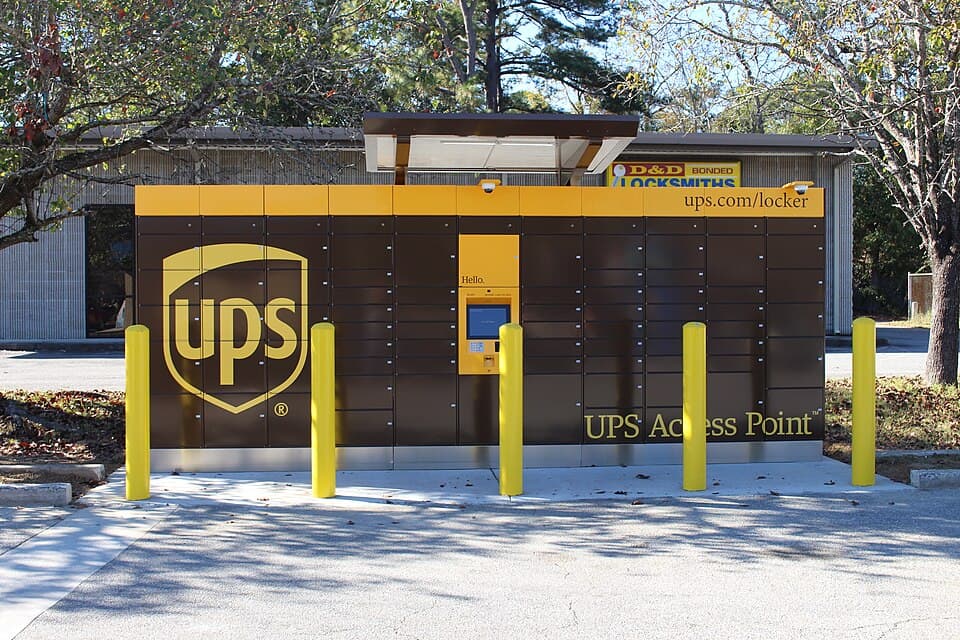

The short answer
A UPS Access Point is a pickup and drop-off location for UPS packages, often inside a local shop or UPS Store. Wait until tracking says your package is ready, then bring your photo ID and tracking number. UPS normally holds it for seven calendar days.
UPS can send your package to an Access Point after a missed delivery, or you can choose one when ordering online. Many are ordinary shop counters. Others use lockers, like the ones in the photo.
How to pick up a package at a UPS Access Point
- Wait for “Awaiting Customer Pickup” in UPS tracking. A requested redirect does not mean your package is there yet.
- Go to the address listed in tracking, during its opening hours.
- Bring your photo ID, tracking number, and any required pickup code. Show them to staff or follow the locker's screen instructions.
If staff cannot find your package, confirm you are at the address shown in UPS tracking and give them the tracking number. Contact UPS or the sender if it is still missing.
What ID do you need?
Bring government-issued photo ID and your tracking number. If your last name matches but the address on your ID differs, bring a current utility bill or other proof of the package address. UPS also accepts a matching full name or full address with the tracking number.
Some senders require a separate four- to six-digit release code. Get it from the sender; your tracking number is not the release code.
How long will UPS hold your package?
Normally, seven calendar days, including weekends. Collect it by the deadline in tracking or it can be sent back to the sender.
Weekend pickup depends on the shop's opening hours, which can differ from UPS's delivery schedule.
How to have a package sent to an Access Point
If the retailer offers it, choose Access Point delivery at checkout. To redirect a package already on its way, select “Change My Delivery” in UPS tracking and use My Choice or the guest option.
Typing a shop's address into your order does not arrange a pickup. Use the checkout or UPS selection process. If you cannot request a redirect, contact the sender.
For an ongoing mailing address, you can rent a UPS Store mailbox. A USPS PO Box has different rules for UPS deliveries.
How to drop off a package or return
Pack and seal your package, attach the prepaid UPS label, and take it to an Access Point that accepts drop-offs.
Return QR codes do not work at every Access Point. Follow the retailer's packing and drop-off instructions. For a UPS Mobile Barcode, choose a location that offers label printing.
If you need packaging or a shipping label, choose a UPS Store or another location that offers those services.
Check the last collection time as well as opening hours. A shop can be open after UPS has picked up for the day.
Find a UPS pickup or drop-off locationUPS Access Point package limits
| Weight | Up to 44 lb |
|---|---|
| Longest side | Up to 38 inches |
| Length plus girth | Up to 130 inches |
Length plus girth is the longest side plus twice the width and twice the height. Standard Access Points also do not accept prepaid drop-offs valued at $1,000 or more.
A UPS drop box has different package limits.
Does UPS Access Point pickup cost extra?
UPS My Choice includes the seven-day hold without an extra holding fee. Basic members pay $5.99 for a one-time Access Point reroute.
Paid My Choice Premium covers the reroute fee. An ongoing Access Point delivery preference also has no reroute charge. Check the price UPS shows before confirming a change.
Can someone else pick it up for you?
If the sender chose Deliver to Addressee Only, the person named on the package must collect it. Otherwise, someone whose government-issued photo ID shows the package address can bring the tracking number and any required release code to collect it.
For someone with a different name and address, read the UPS pickup ID rules before they make the trip.
UPS sources
Checked October 8, 2026. This guide covers UPS Access Point locations in the United States.
More package and delivery guides
UPS guide
Does UPS Deliver to PO Boxes? Rules & Alternatives
Does UPS deliver to PO boxes? Learn when UPS Ground Saver or USPS Street Addressing works, plus alternatives for receiving your packages.
Read guide
UPS guide
Does UPS Deliver on Saturday or Sunday?
Does UPS deliver on weekends? Yes on Saturday, not Sunday for standard services. See UPS Ground and air delivery hours, fees, and real shipping quotes.
Read guide
USPS guide
How Much Does a PO Box Cost? USPS, UPS & Virtual Mailbox Prices (2026)
Compare 2026 USPS PO Box rates by size, published UPS Store mailbox prices, and virtual mailbox plans. Find exact local prices and sources.
Read guide