How to Send Certified Mail
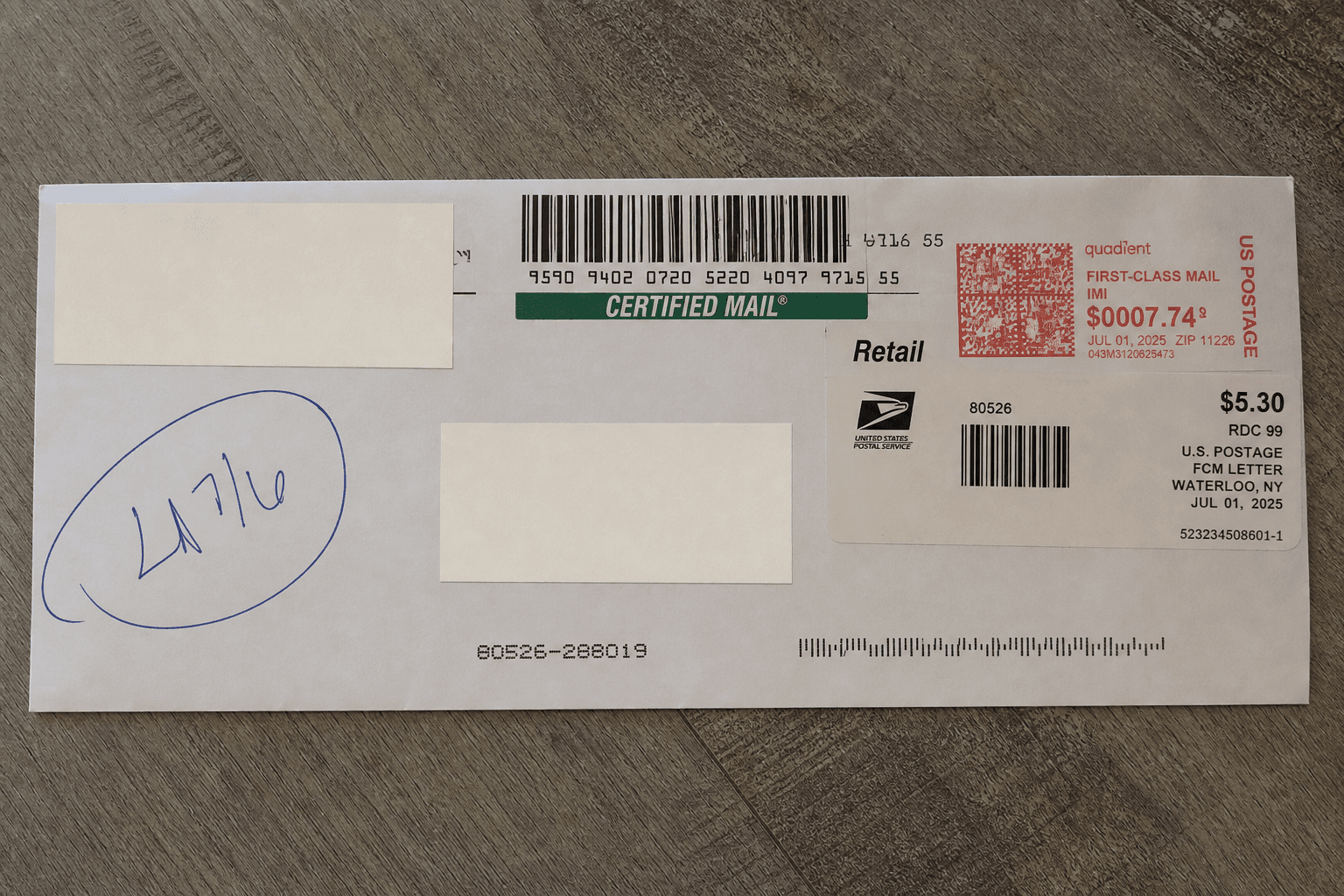
There are a couple of options for sending Certified Mail. You can go to the Post Office and fill out the required forms, or use an online mailing provider that handles the forms and postage for you. We cover both options in this article.
What Is Certified Mail?
Certified Mail is simply an added service for regular First-Class Mail. It lets you check whether your letter was delivered and requires a signature from the person who accepts it.
You can also add an electronic Return Receipt to get a copy of the delivery record and signature digitally, or choose a paper Return Receipt that USPS mails back to you.
Only need proof that you mailed the letter? Compare Certificate of Mailing and Certified Mail to choose the record you need.
Before You Start
- Decide whether you want to mail online or go to the Post Office.
- Your finished document and a copy for your records.
- The recipient's complete name and mailing address.
- Your return address. If you are going to the Post Office, you will also need an envelope that fits your letter.
- A decision about whether you need an electronic or paper Return Receipt.
Still preparing your letter? See our certified letter writing guide for the format, examples and a template.
If you are going to the Post Office, pick up PS Form 3800 for Certified Mail. If you want a paper Return Receipt mailed back to you, also pick up PS Form 3811, the green card. Look for these forms with the mailing supplies near the front. We'll show you how to fill them out below. Use our envelope addressing guide if you need help with the address layout.
Certified Mail with Return Receipt: Electronic or Green Card?
Certified Mail gives you a mailing receipt and tracking. Want a copy of the delivery signature? Add Return Receipt when you mail the letter. Choose an electronic copy or the green card USPS mails back to you.
- Certified Mail
- A mailing receipt and delivery or attempted-delivery information. USPS keeps a delivery record, including the signature; a copy of that signature record is a separate Return Receipt option.
- With electronic Return Receipt
- Select “Return Receipt (electronic)” on Form 3800. For an additional fee, you’ll receive a digital delivery record that includes the signature.
- With paper Return Receipt
- Adds PS Form 3811, the green card. You prepare and attach it before mailing, and USPS mails the completed card back after delivery.
Here's an electronic Return Receipt from a TLP mailing, with personal details hidden.
Your USPS total is the postage plus the Certified Mail fee and any receipt fee. See the Certified Mail cost breakdown for current postal fees. Certified Mail through TLP starts at an estimated $17.13 for one black-and-white page. We handle the paperwork, printing, postage and mailing for you. Additional pages, color printing and Return Receipt options cost extra.
How to Send Certified Mail at the Post Office
1. Prepare and address your envelope
Put the finished document inside, seal the envelope, and add the recipient and return addresses. Keep the address area clear so the mailing label will not cover it. The recipient details on your form should match the envelope.
Sending to a PO Box? Use the box number in place of the street address. See how Certified Mail to a PO Box works, including the address format, pickup, and signature.
Fictional recipient example for the form fields below
Morgan Lee
123 Example Street, Apt 4
Springfield, IL 62704
2. Get PS Form 3800 and fill in the recipient details
PS Form 3800 is usually available with the mailing supplies near the front of the Post Office. Fill in “Sent To” and the address lines with the recipient's name and address, exactly as they appear on your envelope. Under “Extra Services & Fees,” check any add-ons you want, such as “Return Receipt (electronic).”
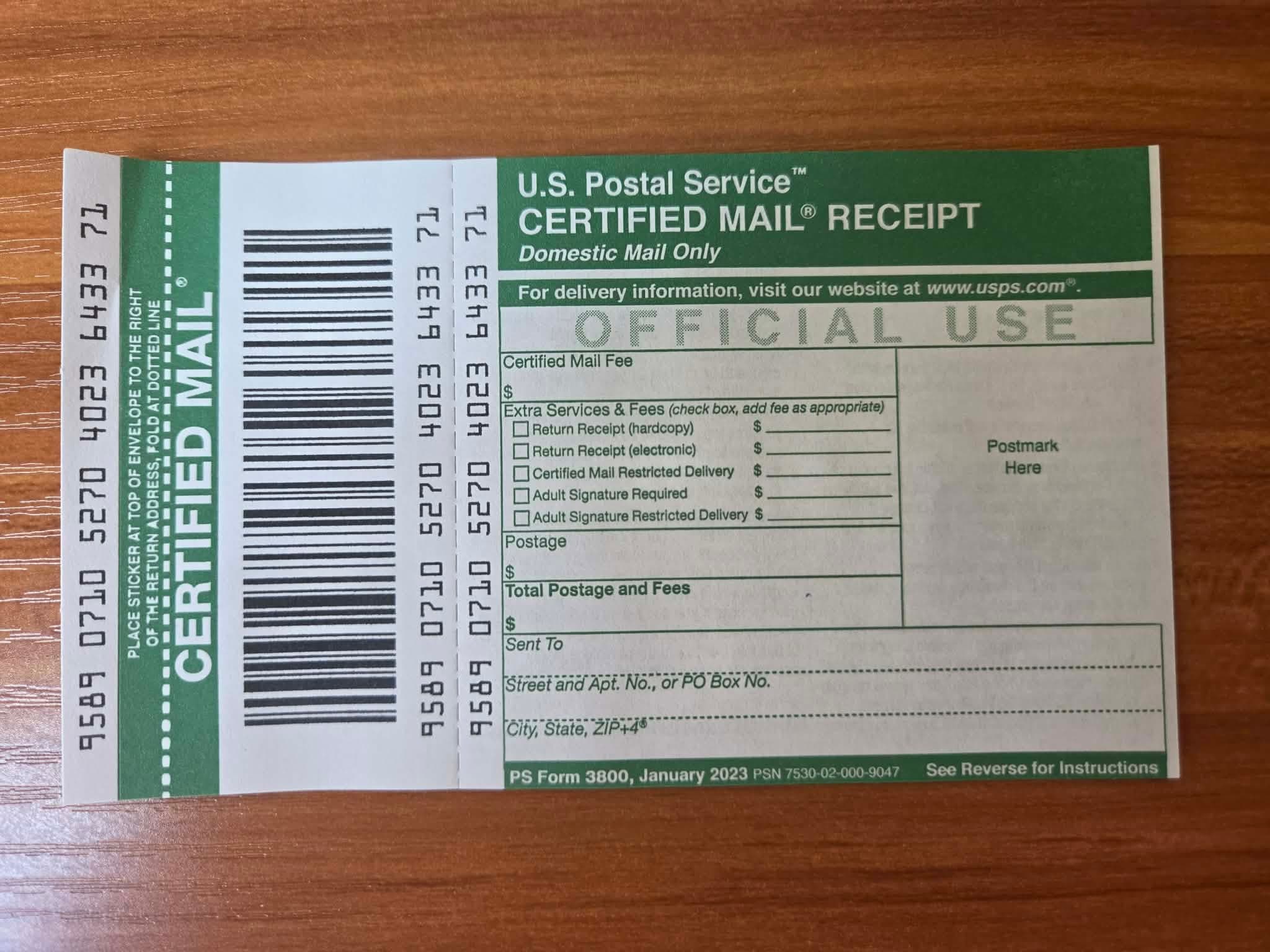
- Sent To
- The recipient’s full name or organization.
- Street and Apt. No., or PO Box No.
- The delivery address, including any apartment, suite or PO Box number.
- City, State, ZIP+4
- The recipient’s city, state and ZIP Code; include ZIP+4 when you have it.
- Extra Services & Fees
- Mark the extra services you want.
- Postmark Here
- Leave this area for the USPS employee.
3. Attach the Certified Mail label
Attach the green Certified Mail label above the recipient's address and to the right of your return address. Leave the receipt portion attached for the clerk to postmark, then keep it for your records.
4. Prepare the green card if you chose paper Return Receipt
If you chose a paper Return Receipt, complete PS Form 3811, the green card, in addition to PS Form 3800. You need both forms for this option.
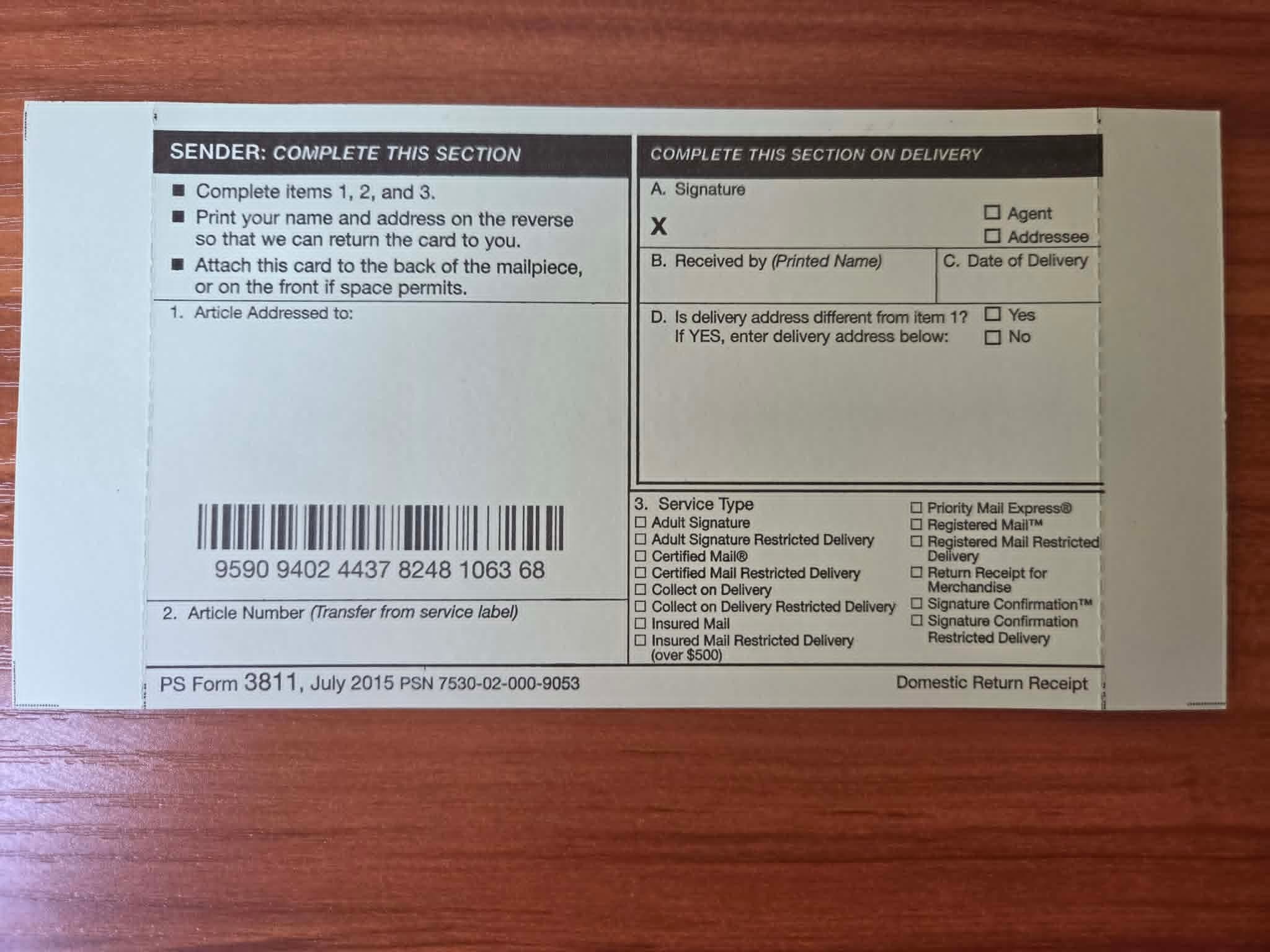
- On Form 3800, check “Return Receipt (hardcopy)” for the paper Return Receipt.
- In “Article Addressed to,” enter the same recipient and address as on the envelope.
- In item 2, “Article Number,” copy your Certified Mail tracking number from Form 3800. Look for the long number printed beside the barcode on the left side of the form. In the Form 3800 photo above, it starts with 9509. This is the number you use to track your letter, not the green card's own barcode number.
- In item 3, “Service Type,” check “Certified Mail” for ordinary Certified Mail. The green card itself is the paper Return Receipt.
- Write your own name and address on the back so USPS knows where to mail the signed card.
- Leave the area labeled “Complete This Section on Delivery” blank. It is filled in when the letter is delivered.
- On a small envelope, attach the card to the back. Keep the delivery address uncovered and add “Return Receipt Requested” near the Certified Mail endorsement.
Restricted Delivery is an optional add-on that limits delivery to the person you name or someone they authorize to receive it. If you purchased this option, check “Certified Mail Restricted Delivery” under “Service Type” on the green card.
Have the clerk check the card and its connection to the Certified Mail item before accepting the letter.
5. Pay and keep your mailing receipt
Present the completed mailing to the USPS employee. Pay the mail-class postage, Certified Mail fee and any optional receipt fee. Ask the clerk to postmark the sender's receipt if you need a dated record of USPS acceptance, then keep it with your copy of the letter.
Before leaving, check that you have the article number and that the receipt shows the options you paid for. Our Certified Mail tracking guide explains how to use the number after mailing.
Using a USPS Self-Service Kiosk
Some Post Offices have self-service kiosks where you can buy Certified Mail postage and print the mailing label yourself. Bring your letter in an addressed envelope. You can find a kiosk near you with the USPS location finder.
Choose “Mail Letters or Packages” on the screen. Follow the prompts to weigh your envelope and enter the mailing details, then select Certified Mail and any Return Receipt option offered. Pay by credit or debit card and attach the printed postage and labels as directed. If you chose a paper Return Receipt, also complete and attach Form 3811 as shown above.
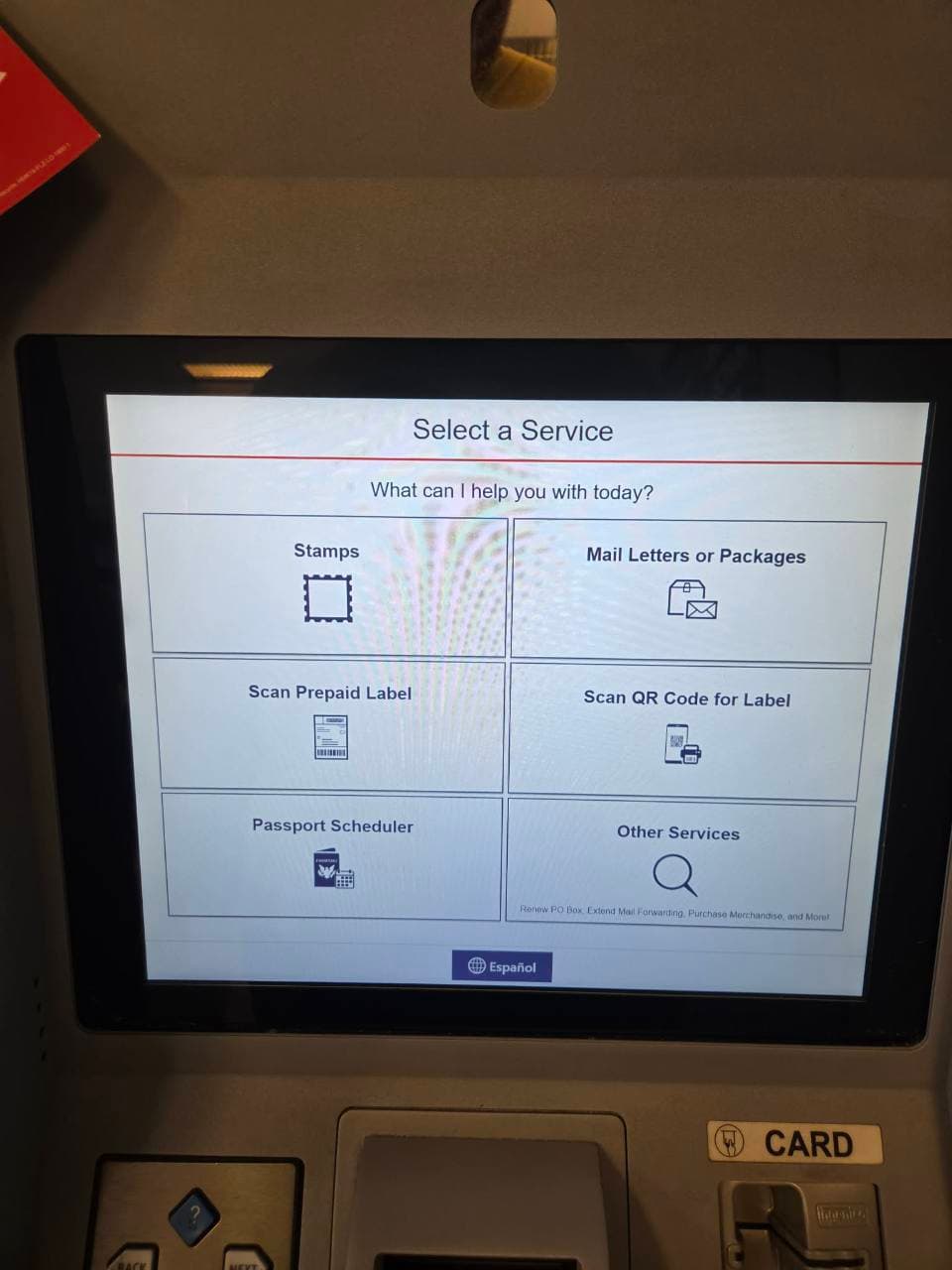
Keep your receipt and tracking number, then place the prepared letter in the Post Office's mail drop. If you need a postmarked Certified Mail receipt, take the letter to a USPS employee before depositing it. The kiosk's payment receipt does not replace a postmarked mailing receipt.
How to Send Certified Mail Online
If you have a finished document and want someone to print and mail it, you can use The Letter Pilot:
- Upload your document or type your letter.
- Enter the recipient and return addresses.
- Select Certified Mail and the available Return Receipt option you want.
- Review the document preview and final total, then continue to checkout and complete payment.
Track Your Letter and Get Your Return Receipt
If you have a TLP account, sign in before sending your letter so you can view tracking updates in your dashboard. Open “Mail Jobs” and select your mailing to see its current status. Use “Track Package” to open the latest USPS tracking details. If you chose an electronic Return Receipt, look under “Documents” in the mailing details and click “Download” next to “Return Receipt” once it is available.
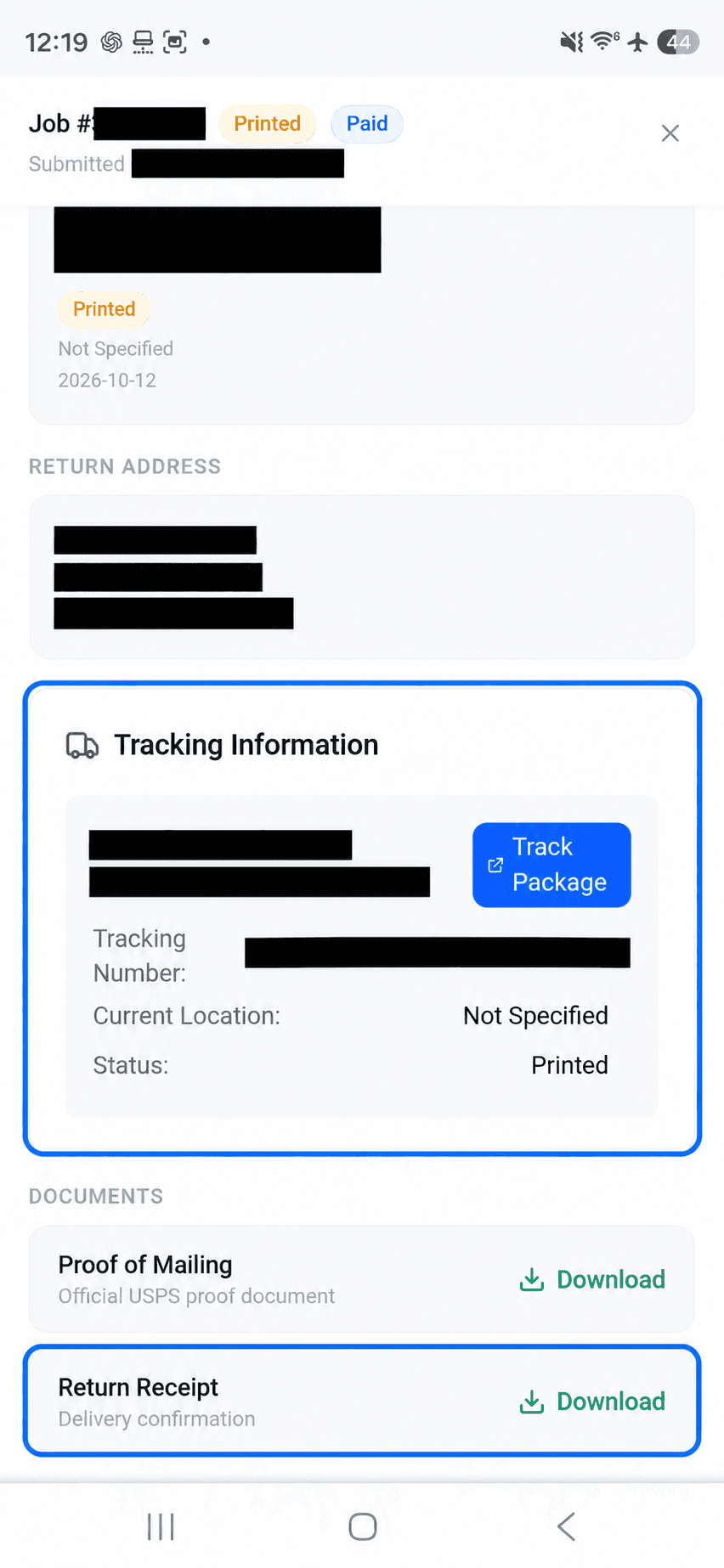
Prefer to mail without a TLP account? Use your tracking number on USPS Tracking to check your letter's progress. If you selected “Certified Mail + Electronic Return Receipt” when you ordered, choose “Return Receipt Electronic” under “Available Actions” and enter your email address. USPS will email the signed delivery record after delivery and once the signature record is ready.
We prepare the physical letter and mail it through USPS. See our Certified Mail online service for current prices, available records and processing times.
Have us print and mail your letterWhat to Keep After Mailing
- A copy of the letter and any enclosures.
- Your mailing receipt and article number (tracking number).
- The delivery or attempted-delivery record.
- The paper or electronic Return Receipt, if purchased and provided after delivery.
For status updates, a notice left at the recipient's address, or help finding a receipt after delivery, continue to the tracking and receipt guide.
Common Questions About Sending Certified Mail
Do I need a special letter format for Certified Mail?
No. Certified Mail is the mailing service, not a special kind of letter. Finish and sign your document as needed, then prepare the envelope and mailing paperwork.
Can I put Certified Mail in a collection box?
If you want a postmarked sender’s receipt, present the letter and completed receipt to a USPS employee. A collection box cannot give you that receipt. Other prepaid Certified Mail arrangements can differ; follow the instructions for the label you are using.
How much does it cost to send a certified letter?
At USPS, the total is your mail-class postage plus the Certified Mail fee and any optional Return Receipt fee. Printing and mailing through an online service has its own charges. Check the current fees and your final total before sending.
Can I send Certified Mail without going to the Post Office?
Yes. The Letter Pilot can print your document and mail it through USPS Certified Mail. You enter the addresses and choose the mailing option online; tracking is included and Return Receipt is optional.
USPS Sources
- USPS Domestic Mail Manual 503: Certified Mail preparation, label placement and Return Receipt requirements.
- PS Form 3800: Certified Mail receipt and preparation instructions.
- PS Form 3811: paper Return Receipt and sender instructions.
- USPS electronic Return Receipt: requesting the signed delivery record by email using your tracking number.
- USPS extra services: mailing records and electronic or paper Return Receipt options.
- USPS kiosk services: Certified Mail, Return Receipt and card payments.
- USPS self-service kiosks: kiosk functions and how to find a location.
More USPS guides
USPS guide
Why Would You Get a Certified Letter? Common Reasons & What to Do
Learn why you might receive Certified Mail, what to do after delivery, how to spot scams, and what happens if you do not pick it up.
Read guideUSPS guide
How to Write a Certified Letter (Format & Examples)
Learn how to write a certified letter with the correct format, sample wording, a complete example, and a reusable template for important notices.
Read guide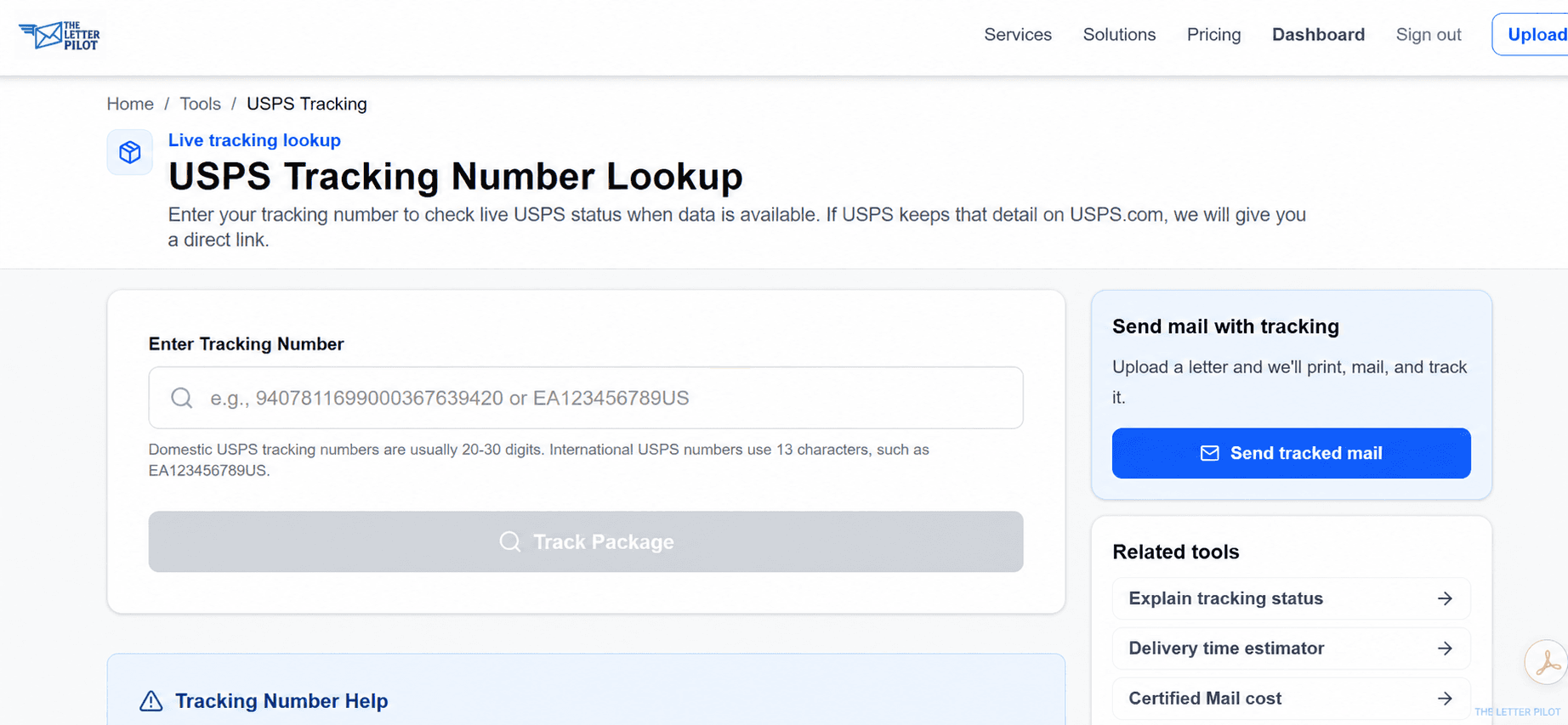
USPS guide
How to Track Certified Mail
Learn where to find your Certified Mail tracking number, check delivery status, and get proof of delivery when available.
Read guide
USPS guide
USPS Registered Mail: Cost & Certified Mail Comparison
USPS Registered Mail starts at $20.90 plus postage. Compare it with Certified Mail, see fees by declared value, and learn how to send it.
Read guide
USPS guide
USPS Tracking Not Updating: What to Do
What a quiet USPS tracking page can mean, how to read the current status, and when to use USPS support or Missing Mail.
Read guide